| Author |
|
danielruf
Joined: 07 Jan 2026
Posts: 24
|
 Posted: Fri 13 Feb '26 8:52 Post subject: Posted: Fri 13 Feb '26 8:52 Post subject: |
 |
|
Maybe my information was incomplete, but I did not just start and stop but also thouroughly tested my application.
I will keep an eye on my setup and come back here, if I see the same crashes.
To me it sounds like some memory leak or something else that takes some time to occur.
So far I did not see further reports, so at least it seems to be some isolated issue (at least this is my current assumption).
Not sure if any httpd.conf related issue is relevant, maybe the Windows error logging has more details. |
|
| Back to top |
|
axel.kam

Joined: 11 Jul 2023
Posts: 30
|
| Posted: Fri 13 Feb '26 10:33 Post subject: |
|
|
httpd 2.4.66 ( Apache Lounge VS18 erver built: Jan 30 2026 15:51:08 ) crash once or twice per day, in log: exited with status 3221226356, or sometimes 255.
in windows log: httpd.exe and ntdll.dll
I've been experimenting for two weeks now, httpd still crashed periodicaly
not sure, that problem with php module or fcgid |
|
| Back to top |
|
RikasMalinka
Joined: 07 Jan 2026
Posts: 16
Location: Poland
|
|
| Back to top |
|
danielruf
Joined: 07 Jan 2026
Posts: 24
|
|
| Back to top |
|
RikasMalinka
Joined: 07 Jan 2026
Posts: 16
Location: Poland
|
| Posted: Sat 14 Feb '26 15:56 Post subject: |
|
|
FAIL 
| Quote: |
Nazwa aplikacji powodującej błąd: httpd.exe, wersja: 2.4.66.0, sygnatura czasowa: 0x697cc5aa
Nazwa modułu powodującego błąd: ntdll.dll, wersja: 10.0.17763.8276, sygnatura czasowa: 0x6960ed42
Kod wyjątku: 0xc0000374
Przesunięcie błędu: 0x00000000000fb499
Identyfikator procesu powodującego błąd: 0x4d80
Godzina uruchomienia aplikacji powodującej błąd: 0x01dc9ce54b985fa1
Ścieżka aplikacji powodującej błąd: D:\xampp\apache\bin\httpd.exe
Ścieżka modułu powodującego błąd: C:\Windows\SYSTEM32\ntdll.dll
Identyfikator raportu: 86c167b9-e22b-4421-a88b-aed49ca78d61
Pełna nazwa pakietu powodującego błąd:
Identyfikator aplikacji względem pakietu powodującego błąd:
Pakiet błędów 1695703728024279616, typ 4
Nazwa zdarzenia: APPCRASH
Odpowiedź: Niedostępny
Identyfikator pliku CAB: 0
Podpis problemu:
P1: httpd.exe
P2: 2.4.66.0
P3: 697cc5aa
P4: StackHash_effe
P5: 10.0.17763.8276
P6: 6960ed42
P7: c0000374
P8: PCH_0D_FROM_ntdll+0x00000000000A0E24
P9:
P10:
|
|
|
| Back to top |
|
Crafted

Joined: 04 Feb 2026
Posts: 23
|
| Posted: Sat 14 Feb '26 17:05 Post subject: |
|
|
| that was to be expected, if you really wanna try something you probably gonna recompile the whole package most likely and replace there openssl, however I just gived up, just waiting for a proper version. |
|
| Back to top |
|
admin
Site Admin

Joined: 15 Oct 2005
Posts: 759
|
| Posted: Sun 15 Feb '26 14:45 Post subject: |
|
|
| What about other versions of PHP ? |
|
| Back to top |
|
tangent
Moderator
Joined: 16 Aug 2020
Posts: 461
Location: UK
|
| Posted: Sun 15 Feb '26 20:52 Post subject: |
|
|
Re this "heap" problem, and who's responsible for the HTTPD process crashing; OpenSSL, PHP, other?
RikasMalinka's initial post shows an event log entry with ntdll.dll as the culprit, but we know that kernel based DLL is at the end of the line. A stack trace of the calling processes would help here, so a dump of the process at crash time is required.
In the absence of complex debugging tools, I'd consider using SysInternals ProcDump and MS WinDbg utilities to try and localise which module is to blame.
If possible, starting with ProcDump (https://download.sysinternals.com/files/Procdump.zip), configure it to create a dump file. In an administrator command window, enable ProcDump and then set it up to capture an unhandled exception from the running httpd.exe process.
| Code: | C:\>procdump -i
C:\>procdump -e -ma httpd.exe
|
Sit back and wait for the crash...
Once you've got your dump file (default location is C:\), uninstall ProcDump.
Next, install MS WinDbg
| Code: | C:\>winget install Microsoft.WinDbg
|
Run WinDbg and open the dump file, and then within WinDbg run the command:
Even without module symbols, the resulting raw stacktrace will hopefully show which module triggered the problem (addresses translate to module names).
Unfortunately build symbols would be needed to find the precise function call within a given module. |
|
| Back to top |
|
RikasMalinka
Joined: 07 Jan 2026
Posts: 16
Location: Poland
|
| Posted: Mon 16 Feb '26 1:02 Post subject: |
|
|
| I will try to do this as soon as I can allow the web server to be taken offline. Unfortunately, this will most likely be during the weekend. On working days the server has to run reliably, so for now it is running on 2.4.65. |
|
| Back to top |
|
MIP
Joined: 06 Feb 2026
Posts: 4
|
| Posted: Tue 17 Feb '26 18:16 Post subject: |
|
|
I’m also having problems with the latest version. Apache crashes several times a day. If I roll back to 2.4.65, everything is stable again. I’m using PHP 8.3.30 with fcgid.
Apache log :
| Code: | [Mon Feb 16 16:10:24.054139 2026] [mpm_winnt:notice] [pid 12248:tid 328] AH00428: Parent: child process 12340 exited with status 3221226356 -- Restarting.
[Mon Feb 16 16:10:24.977363 2026] [mpm_winnt:notice] [pid 12248:tid 328] AH00455: Apache/2.4.66 (Win64) mod_fcgid/2.3.10-dev OpenSSL/3.6.1 configured -- resuming normal operations
[Mon Feb 16 16:10:24.977363 2026] [mpm_winnt:notice] [pid 12248:tid 328] AH00456: Apache Lounge VS18 erver built: Jan 30 2026 15:51:08
[Mon Feb 16 16:10:24.977363 2026] [core:notice] [pid 12248:tid 328] AH00094: Command line: 'C:\\Apache2\\bin\\httpd.exe -d C:/Apache2'
[Mon Feb 16 16:10:24.992991 2026] [mpm_winnt:notice] [pid 12248:tid 328] AH00418: Parent: Created child process 10048
[Mon Feb 16 16:10:25.619283 2026] [mpm_winnt:notice] [pid 10048:tid 368] AH00354: Child: Starting 350 worker threads. |
Windows log :
| Code: | Faulting application name: httpd.exe, version: 2.4.66.0, time stamp: 0x697cc5aa
Faulting module name: ntdll.dll, version: 10.0.20348.4648, time stamp: 0x6e40a9c3
Exception code: 0xc0000374
Fault offset: 0x0000000000103ec9
Faulting process id: 0x3034
Faulting application start time: 0x01dc9f1a44e814ae
Faulting application path: C:\Apache2\bin\httpd.exe
Faulting module path: C:\WINDOWS\SYSTEM32\ntdll.dll
Report Id: d6cc2269-4c06-4ab5-98bc-051255717c57
Faulting package full name:
Faulting package-relative application ID: |
|
|
| Back to top |
|
James Blond
Moderator

Joined: 19 Jan 2006
Posts: 7481
Location: EU, Germany, Next to Hamburg
|
| Posted: Thu 19 Feb '26 10:46 Post subject: |
|
|
code 0xC0000374 = STATUS_HEAP_CORRUPTION
Did you try the thread-safe version of PHP yet? |
|
| Back to top |
|
MIP
Joined: 06 Feb 2026
Posts: 4
|
| Posted: Thu 19 Feb '26 15:46 Post subject: |
|
|
| Since I’m using PHP with fcgid, shouldn’t the PHP version I use be NTS? I’ve always used the NTS version without any issues. If I downgrade to 2.4.65 and keep the same NTS PHP version, the instabilities disappear. |
|
| Back to top |
|
Steffen
Moderator
Joined: 15 Oct 2005
Posts: 3206
Location: Hilversum, NL, EU
|
|
| Back to top |
|
Crafted
Joined: 04 Feb 2026
Posts: 23
|
| Posted: Thu 19 Feb '26 21:24 Post subject: |
|
|
| I still don't get why you guys don't stick to v3.5.5 LTS. |
|
| Back to top |
|
Steffen
Moderator
Joined: 15 Oct 2005
Posts: 3206
Location: Hilversum, NL, EU
|
|
| Back to top |
|
nono303

Joined: 20 Dec 2016
Posts: 235
Location: Lille, FR, EU
|
| Posted: Fri 20 Feb '26 17:13 Post subject: |
|
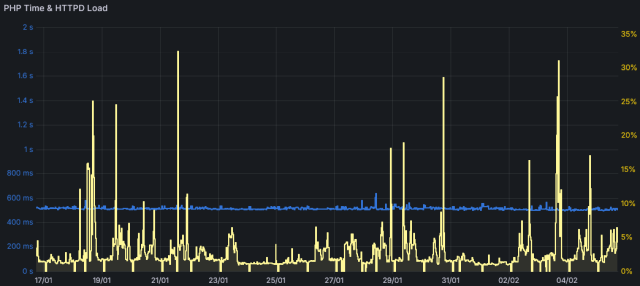
|
Hi
Fyi, I'm currently running httpd 2.4.66 + php 8.5.x TS via mod_fcgid, all linked with (the same) OpenSSL 3.6.1
I didn't have any crash so far.
If you have a specific use case causing the issue, I could test it on my side.
You could also try my custom build here (vs18 x64 avx & avx2 releases with php 8.5.3)
Last edited by nono303 on Sat 21 Feb '26 9:52; edited 2 times in total |
|
| Back to top |
|
Crafted
Joined: 04 Feb 2026
Posts: 23
|
| Posted: Fri 20 Feb '26 18:16 Post subject: |
|
|
| Steffen wrote: | | Build also with 3.5.5 |
Ok ty will give one more try and switch tonight on 3.5.5 one.
| nono303 wrote: | | I didn't have any crash so far. |
Please tell me you tested it in production (running for at least 3 > more) days not only start and stop or few hours at development... |
|
| Back to top |
|
nono303
Joined: 20 Dec 2016
Posts: 235
Location: Lille, FR, EU
|
| Posted: Fri 20 Feb '26 19:06 Post subject: |
|
|
24/7 average 37 ops/s
 |
|
| Back to top |
|
Crafted
Joined: 04 Feb 2026
Posts: 23
|
| Posted: Fri 20 Feb '26 21:36 Post subject: |
|
|
| Ah I see, custom build... |
|
| Back to top |
|
axel.kam
Joined: 11 Jul 2023
Posts: 30
|
| Posted: Sat 21 Feb '26 11:00 Post subject: |
|
|
| axel.kam wrote: | | httpd 2.4.66 ( Apache Lounge VS18 erver built: Jan 30 2026 15:51:08 ) crash once or twice per day |
Both VS18 version (260107 and 260131) still crash. I try copy 3.6.0 openssl library and mod_ssl from old to new VS18 build, this is no matter.
Rolling back to the 2.4.66 with 3.6.0 (VS17) and stability is restored. No any crash with it. Now I use VS17 build for production (httpd-2.4.66-251206-Win64-VS17.zip).
Ok, I think that all. Maybe something in new building system is wrong.
I have two identical hardware and software machine with the same apache config (except load type and VHost domain), second mashine with much lower load no crash with new builds (VS18).
I'm confused.
Continue wathing. |
|
| Back to top |
|



